Makeup Museum Content & Inventory System
Product-led website and CMS modernization for a virtual museum. Re-architected content, rebuilt publishing workflows, and launched a public-facing inventory experience for a 10,000+ piece collection with loan tracking.
Overview
The Makeup Museum is a virtual museum (no physical location) dedicated to the exhibition, preservation, and research of cosmetics across eras and cultures. While the museum has no permanent public building, collection pieces are loaned to physical exhibits and shown in various locations.
I led a full modernization of the museum's digital presence, from discovery and UX framing through solution definition, approvals, and delivery, so the site could function like a credible "online museum" (not a personal blog) and so the team could manage a large collection at scale.
We redesigned and rebuilt the WordPress site to match the museum's established logo and brand, re-engineered the blog and vlogging foundations, strengthened social media integration, and implemented a custom CMS plus an inventory system enabling the museum to manage 10,000+ items—including location, whether an item is on loan/borrowed, and public-facing visibility of the collection.
Goals
- Modernize the site to reflect the museum's established brand identity and improve credibility as an online museum
- Improve navigation and findability so visitors can quickly understand 'what this is' and explore content confidently
- Launch a scalable inventory system supporting 10,000+ items, including location + loan/borrow status
- Improve blogging + vlogging capability to reach a larger audience and sustain ongoing publishing
- Reduce manual operational burden by enabling structured workflows
Constraints
- The museum is virtual (no public physical location), but the collection is loaned to exhibits—site messaging and workflows must support both realities
- Inventory operations previously relied on manual processes; the CMS and inventory system needed to reduce friction for non-technical staff
What I Led (Product + UX Leadership)
Business Development + Approvals
Sold the website engagement, led stakeholder alignment, and drove approvals through key decisions
Product Direction
Owned the end-to-end plan, defined the phased approach, and prioritized what to build first
UX Strategy + Service Design
Led discovery and framing, designed workflows across discovery → exploration → requests → operational management
Information Architecture
Rebuilt structure and labeling to shift perception from 'blog' to 'museum,' improving clarity and content findability
CMS + Inventory Workflows
Designed the admin experience and operational workflows for managing a 10,000+ item collection
Execution Leadership
Led Scott through implementation and QA to ensure build fidelity and maintainability
Phased Timeline
Phase 1: Web Design
Design mock-up for homepage + up to two revision cycles
Phase 1: Web Development
Development begins after design approval; test URL review, final approval, then launch
Phase 2: Museum Inventory
Public-facing inventory archive + admin method to add/manage inventory + sorting/filtering
Project Details
- Role
- Product Manager & UX Director (UX SME)
- Timeline
- Phased delivery
- Team
- Christina Alchus (PM & UX Director), Scott (Designer/Developer)
- Deliverables
- • UX discovery + framing (requirements, prioritization, success criteria)• Heuristic evaluation + prioritized UX recommendations• Information architecture + taxonomy/category model• Website redesign aligned to existing brand• Re-engineered blog + vlogging foundations• Custom CMS for non-technical publishing
+ 4 more deliverables
- Tools
- FigmaWordPress (custom build)Google AnalyticsAdobe Creative Suite
Discovery
UX Discovery
Conducted stakeholder interviews and requirements gathering to understand the museum's goals, content management challenges, and operational pain points.
- Identified confusion between "blog" vs "museum" positioning
- Documented manual inventory tracking pain points
- Mapped loan request workflow inefficiencies
Heuristic Evaluation
Performed a comprehensive heuristic evaluation to identify usability and credibility issues with the existing site.
- Navigation and findability breakdowns
- Content hierarchy and structure issues
- Brand alignment opportunities
Key Findings
Clarity of Purpose
Site needed to clearly communicate "virtual museum" identity vs personal blog
Navigation & Findability
Visitors struggled to explore content and understand site structure
Operational Friction
Manual processes for inventory and loan requests created bottlenecks
Define
Problem Synthesis
Identity Confusion
Visitors couldn't distinguish between personal blog content and legitimate museum operations, undermining credibility.
Manual Operations
Paper-based inventory tracking and email-based loan requests created significant operational bottlenecks.
Content Discoverability
Poor navigation and structure made it difficult for researchers and enthusiasts to find relevant content.
User Stories
"Find high-resolution images with proper attribution for thesis work"
Advanced search, filtering, and clear provenance data in inventory system
"Track 10,000+ items, loan status, and locations efficiently"
Digital inventory with location tracking and loan workflow automation
"Quickly browse and discover interesting collection pieces"
Visual thumbnails, improved navigation, and mobile-responsive design
Design
Website + CMS
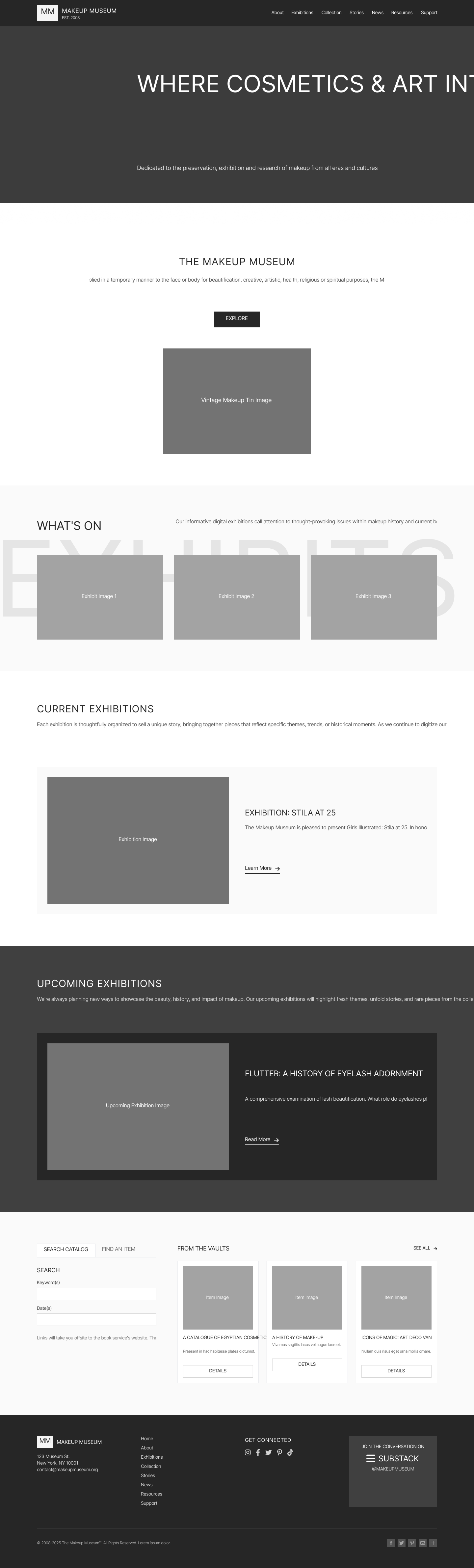
Modern Website Redesign
- •Custom WordPress build aligned to established brand identity
- •Shift perception from 'personal blog' to 'online museum'
- •Improved navigation and visual hierarchy
- •Responsive design for mobile visitors
Content Architecture
- •Restructured information architecture
- •Clear taxonomy and category model
- •Dedicated pages for news, press, and articles
- •Beauty Library relocated to dedicated subpage
Publishing CMS
- •Non-technical content publishing workflow
- •Re-engineered blog and vlogging foundations
- •Social media integration hooks
- •Google Analytics instrumentation
Inventory System
Custom inventory system enabling management of 10,000+ collection items with public archive and admin workflows
Public-Facing Inventory Archive
Searchable, filterable collection browser for 10,000+ items
Inventory Management System
Admin CMS for adding, editing, and organizing collection items
Location & Loan Tracking
Track item location, loan status (on loan, borrowed, available)
Automated Loan Request Workflow
Structured intake replacing manual email back-and-forth
Spreadsheet Import
Bulk import capability for efficient data migration
Artifacts & Deliverables
Key UX research and design deliverables from the project
Heuristic Evaluation Report
PDF Document
Comprehensive usability analysis with prioritized recommendations
User Personas
Research Deliverable
4 decision-driving personas based on stakeholder interviews and workflow analysis
Empathy Maps
UX Research
Museum Staff and Public Visitor empathy maps detailing goals, frustrations, and behaviors
Journey Mapping
UX Research
User journey maps for public visitors and internal staff workflows
Website Redesign
Design Deliverable
Homepage and key pages showcasing modernized museum experience
Information Architecture
System Design
Complete IA diagram covering frontstage experience, backend operations, and inventory management
Deliver
~90%
Increase in Site Traffic
Key Outcomes
- Increased site traffic by ~90%
- Replaced a manual paper-based inventory process with a scalable digital inventory system (10,000+ items)
- Improved operational control of inventory (location + loan/borrow status) and made the collection easier to publish publicly
- Expanded blogging/vlogging capabilities to reach a larger audience with consistent publishing workflows
- Reduced manual back-and-forth by automating loaning requests through structured workflows